613 private links
It has become harder and harder to wipe and reflash modern Android smartphones with an Android OS that the user controls. Partly due to bootloader encryption and the like by the hardware manufacturers (in the name of security) but in my estimation mostly due to every new model using slightly different firmware configuration which is additionally never released open source. This constant moving of the goalposts makes it very hard for the volunteer-based Android modding community to keep up, even just considering yesteryear's model line-up.
My personal take on the current Android modding scene is that apart from Google Pixel phones and a select few other models, it has become practically impossible for a technically literate user to reinstall the OS on their phone, because of the nefarious combination of the manufacturer locking the bootloader and no LineageOS mod being available for the user's model even if the bootloader lock can be defeated.
The result? I think I'm far from alone in maintaining a very old device just because I know I can run LineageOS on it. Also, I really dislike the massive size of Pixel phones along with most other recent phone models.
In light of all this, I really appreciate the efforts the community is putting into wrangling some user-control back on Google's increasingly locked down Android platform, but in the long-term (short-term?) Google's Android may be a lost cause (that's not to say there aren't community efforts to free Android).
Shizuku on the Samsung Galaxy S25 FE
As it happens, I find myself required to use an S25 daily. I have of course installed F-Droid, and changed the default launcher to Kvaesitso. But I had resigned any hope on being able to whittle down the massive list of unwanted apps that came preinstalled on the system. All I could do was block some of them, such as Youtube, and simply hide others from the launcher.
Enter Shizuku! (I only heard about it this week).
And yes, getting it up and running was complicated, but it worked! With Shizuku properly configured, I was able to use Canta to uninstall any app on the phone. And by the way, the list of apps is scaringly long.
In short, I followed the installation instructions for a phone without root access (wireless debugging)
But I quickly discovered that the Shizuku process kept terminating within seconds after starting. So as suggested in the Canta README, I tested the forked Shizuku version and it has been rock solid.
Links below:
- https://github.com/thedjchi/Shizuku - forked version of Shizuku, which I installed from APK
- https://github.com/samolego/Canta - installed from APK
- https://github.com/timschneeb/awesome-shizuku
- https://addrom.com/what-is-shizuku
- https://www.androidpolice.com/how-to-use-shizuku-for-adb-rootless-mods-on-any-android-device
- https://www.androidauthority.com/best-shizuku-apps-android-3659353
Interesting. Could perhaps be useful.
Secure peer-to-peer chat that is serverless, decentralized, and ephemeral.

Instantly test run Linux distros online in the cloud for free, right from your web browser. No installation or live boot required.
[...] useful site which lets you rank over 20k Ikea products by how long they will approximately take to build.
Surveillance Camera Map built on OpenStreetMap.
Clearly someone in Uppsala has been diligent - it has more than six times as many registered cameras than Stockholm :-)
Aswan High Dam Reservoir, aka Lake Nasser.
Informative page on the Word Lake Database, run by the International Lake Environment Committee Foundation (ILEC).
Här kan du söka i strukturerade språkliga data, exempelvis ordlistor eller annan tabulär data.
Gratis busskort gav ökad frihet i utsatta områden (KTH)
"Does a monthly bus pass make a difference? Consequences of circumscribed mobility in two structurally disadvantaged districts in Sweden", Transportation Research Interdisciplinary Perspectives, DOI: http://doi.org/10.1016/j.trip.2026.101857
- https://www.kth.se/om/nyheter/centrala-nyheter/gratis-busskort-gav-okad-frihet-i-utsatta-omraden-1.1460295. Fredrik Johansson, forskare på Institutionen för hållbar utveckling, miljövetenskap och teknik.
Höga priser på kollektivtrafik begränsar rörligheten för boende i utsatta områden. När sju personer med låg inkomst fick tre månaders gratis kollektivtrafik upplevde de att det gav dem frihet och ökad trygghet. Det visar en ny undersökning från KTH.
https://www.dagensarena.se/innehall/gratis-kollektivtrafik-gav-laginkomsttagare-okad-rorlighet-och-trygghet, 2026-02-27Priset på kollektivtrafik påverkar de boende i utsatta områden. Höga priser kan leda till en begränsad rörlighet och en känsla av att ”sitta fast” i den egna stadsdelen.
https://forskning.se/2026/02/27/gratis-busskort-gav-frihet-och-trygghet, 2026-02-27
Mobilitetsorättvisa för familjer i utsatta områden påverkar social hållbarhet (SU)
- https://www.su.se/forskning/nyheter-forskning/nyhetsartiklar/2024-09-27-mobilitetsorattvisa-for-familjer-i-utsatta-omraden-paverkar-social-hallbarhet. Tanja Joelsson, Dag Balkmar, Malin Henriksson.
- "Familjers vardagsmobilitet i ”socialt utsatta områden”: Konsekvenser för välfärd, rättvisa och hållbarhet" fulltext i DiVA
- "Rättvist resande?: Villkor, utmaningar och visioner för samhällsplaneringen" fulltext i DiVA
Lorem Ipsum generators are useful when developing/prototyping web pages
- Star Trek Ipsum. This one is fun! Also it's FOSS with source code on Github.
- "Back-to-the-future" text generator. Simply set the number of desired paragraphs. Text is generated on the web page.
- Carl Sagan Ipsum.
"Awesome Ipsum", list of text generators.
In short, add
layout python3to .envrc.
To customize the name of the virtualenv that direnv automatically creates, add the line export VIRTUAL_ENV=your_venv_name to the top of the file.
- https://github.com/direnv/direnv/wiki/Python - official docs
- https://github.com/direnv/direnv/issues/1264 - Activate python venv by default?
- https://github-wiki-see.page/m/direnv/direnv/wiki/Python
- https://stackabuse.com/managing-python-environments-with-direnv-and-pyenv
- https://www.keiruaprod.fr/blog/2023/01/26/using-direnv.html
And also, completely new to me, it is possible to use direnv with Github Actions (with a complete example in the direnv docs)!
How using a few ideas from software engineering can help data scientists, analysts and researchers write reliable code
Authored by Bruno Rodrigues, published 2023-10-03.
The book can be read for free online or y can buy a DRM-free Epub or PDF on Leanpub.
I wanted to add a follow=Path {/some/symlink} statement to an existing unison job between two Linux machines, one running Ubuntu Noble with unison 2.53.3 and one running Ubuntu Jammy with unison 2.51.5.
However, whichever way I specified the path/name to the symlink, unison would just sync the link itself instead of the contents of the directory it pointed at.
Exasperated, I thought perhaps the version mismatch between the two unison clients may be causing the weird behaviour. So I tested syncing between the Jammy machine and another Jammy machine that also runs unison 2.51.5. And the sync worked as expected.
$ cat .unison/test.prf
root = /home/taha/KVT
root = ssh://luxor//media/bay/taha/KVT
follow = Path projects/dev
On the remote we have the following symlink:
/media/bay/taha/KVT/projects/dev -> /media/bay/taha/projects/ansible/devFiguring out how to use multiple password stores, each with their own GPG key.
And importantly, how to make the password stores work transparently with the Android app?
The point is to be able to share a specific folder (and all its subfolders) with a collaborator without exposing the secrets in the rest of the passwordstore.
🚨 I just found out, the Android Password Store has been retired by its author https://github.com/android-password-store/Android-Password-Store/discussions/3260 🚨
But there is a fork! https://github.com/agrahn/Android-Password-Store with an app on the F-Droid store https://f-droid.org/packages/app.passwordstore.agrahn
Some ideas from the interwebs:
- symlink folders into the passwordstore
- use direnv to set the environment var PASSWORD_STORE_DIR
- use git submodules
I tried the symlink approach: it works nicely enough on the desktop computer, but not at all on Android with the Passwordstore app.
I considered but did not test the other ideas.
After some more browsing and reading I realized that the pass init command does everything I want.
Starting from the entire passwordstore being encrypted using key A.
Then, assuming you have created GPG key B, re-encrypt folder aaa in passwordstore:
$ pass init --path=aaa BThat's it. Now only key B can decrypt any secrets in the aaa directory (recursively). We can re-encrypt using multiple key by simply listing them, pass init --path=aaa B C D.
- https://askubuntu.com/questions/929307/how-to-change-the-gpg-key-of-the-pass-password-store
- https://lists.zx2c4.com/pipermail/password-store/2020-June/004183.html
Related: how to generate a new GPG keypair
- https://www.linuxbabe.com/security/a-practical-guide-to-gpg-part-1-generate-your-keypair
- https://docs.github.com/en/authentication/managing-commit-signature-verification/generating-a-new-gpg-key
Note that the --expert flag is required to display the option to use ECC (elliptic curve crypto) keys.
taha@rosetta:~
$ gpg --expert --full-gen-key
gpg (GnuPG) 2.2.27; Copyright (C) 2021 Free Software Foundation, Inc.
This is free software: you are free to change and redistribute it.
There is NO WARRANTY, to the extent permitted by law.

Please select what kind of key you want:
   (1) RSA and RSA (default)
   (2) DSA and Elgamal
   (3) DSA (sign only)
   (4) RSA (sign only)
   (7) DSA (set your own capabilities)
   (8) RSA (set your own capabilities)
   (9) ECC and ECC
  (10) ECC (sign only)
  (11) ECC (set your own capabilities)
  (13) Existing key
  (14) Existing key from card
Your selection? 9
Please select which elliptic curve you want:
   (1) Curve 25519
   (3) NIST P-256
   (4) NIST P-384
   (5) NIST P-521
   (6) Brainpool P-256
   (7) Brainpool P-384
   (8) Brainpool P-512
   (9) secp256k1
Your selection? 1
Please specify how long the key should be valid.
         0 = key does not expire
      <n>  = key expires in n days
      <n>w = key expires in n weeks
      <n>m = key expires in n months
      <n>y = key expires in n years
Key is valid for? (0)
Key does not expire at all
Is this correct? (y/N) y

GnuPG needs to construct a user ID to identify your key.

Real name: <my name>
Email address: <email address>
Comment:
You selected this USER-ID:
    "<Real name> (<Comment>) <Email address>"

Change (N)ame, (C)omment, (E)mail or (O)kay/(Q)uit? O
We need to generate a lot of random bytes. It is a good idea to perform
some other action (type on the keyboard, move the mouse, utilize the
disks) during the prime generation; this gives the random number
generator a better chance to gain enough entropy.
Please enter the passphrase to
protect your new key
Passphrase:
Repeat:
We need to generate a lot of random bytes. It is a good idea to perform
some other action (type on the keyboard, move the mouse, utilize the
disks) during the prime generation; this gives the random number
generator a better chance to gain enough entropy.
gpg: key <short key id> marked as ultimately trusted
gpg: directory '~/.gnupg/openpgp-revocs.d' created
gpg: revocation certificate stored as '~/.gnupg/openpgp-revocs.d/<long key id>.rev'
public and secret key created and signed.

pub   ed25519 2026-02-24 [SC]
      <long key ID>
uid                      <Real name> (<Comment>) <Email address>
sub   cv25519 2026-02-24 [E]
RSA 4096 is only marginally more secure than RSA 2048 and the consensus is that it is not worth it. For better security than RSA 2048, use elliptic curve crypto instead.
https://www.gnupg.org/faq/gnupg-faq.html#no_default_of_rsa4096
How to export your keypair
Export your public key
gpg --armor --export <key id> > pubkey.asc
Export your private key
gpg --export-secret-keys --armor <key id> > privkey.asc
New idea, perhaps better and less hacky
Directly inspired by this great explainer of how using multiple keys for specific folders should be setup https://github.com/agrahn/Android-Password-Store/issues/512#issuecomment-3387614461
Change passphrase of your GPG key
taha@rosetta:~
$ gpg --edit-key <key name>
gpg (GnuPG) 2.2.27; Copyright (C) 2021 Free Software Foundation, Inc.
This is free software: you are free to change and redistribute it.
There is NO WARRANTY, to the extent permitted by law.

Secret key is available.

sec  rsa2048/<key short id>
     created: 2014-11-28  expires: never       usage: SC
     trust: ultimate      validity: ultimate
ssb  rsa2048/<key short id>
     created: 2014-11-28  expires: never       usage: E
[ultimate] (1). <Real name> <Email address>

gpg> passwd
Please enter the passphrase to unlock the OpenPGP secret key:
"<Real name> <Email address>"
2048-bit RSA key, ID <key short id>,
created 2014-11-28.

Passphrase:
Please enter the new passphrase
Passphrase:
Repeat: - What better way to start than with Elena Rossini's four-minute video https://blog.elenarossini.com/fediverse-video
[the] technology is a facilitating thing. It's like trying to describe how a bicycle works, rather than why you ride it.
Instead, what the Fediverse is, is a place to have conversations online without algorithms, AI, and ads getting in the way.
Which is increasingly a rare thing online.
Almost the entirety of the internet, from SEO on the web to YouTube to TikTok to Spotify to Instagram and X and Facebook, has been turned into a race to game an algorithm designed to sell ads.
What makes the Fedi unique is that it's not that.
https://gts.sadauskas.id.au/@aj/statuses/01KHCQFQVEXJKWT7X2HEH5WW1H
- open https://openalex.org and search for "fediverse"
lots of interesting hits- add Author stats, see that there is around 200 authors - not just a few prolific authors/groups
- sort by "citation count", explore the most cited papers
- stats from 2024 with world map https://www.sfscon.it/wp-content/uploads/2024/11/173071555849720241026-tobiasd-SFSCon24-aboutFediverse.en_.pdf#page=8
- Fediverse: built on open standards and free software
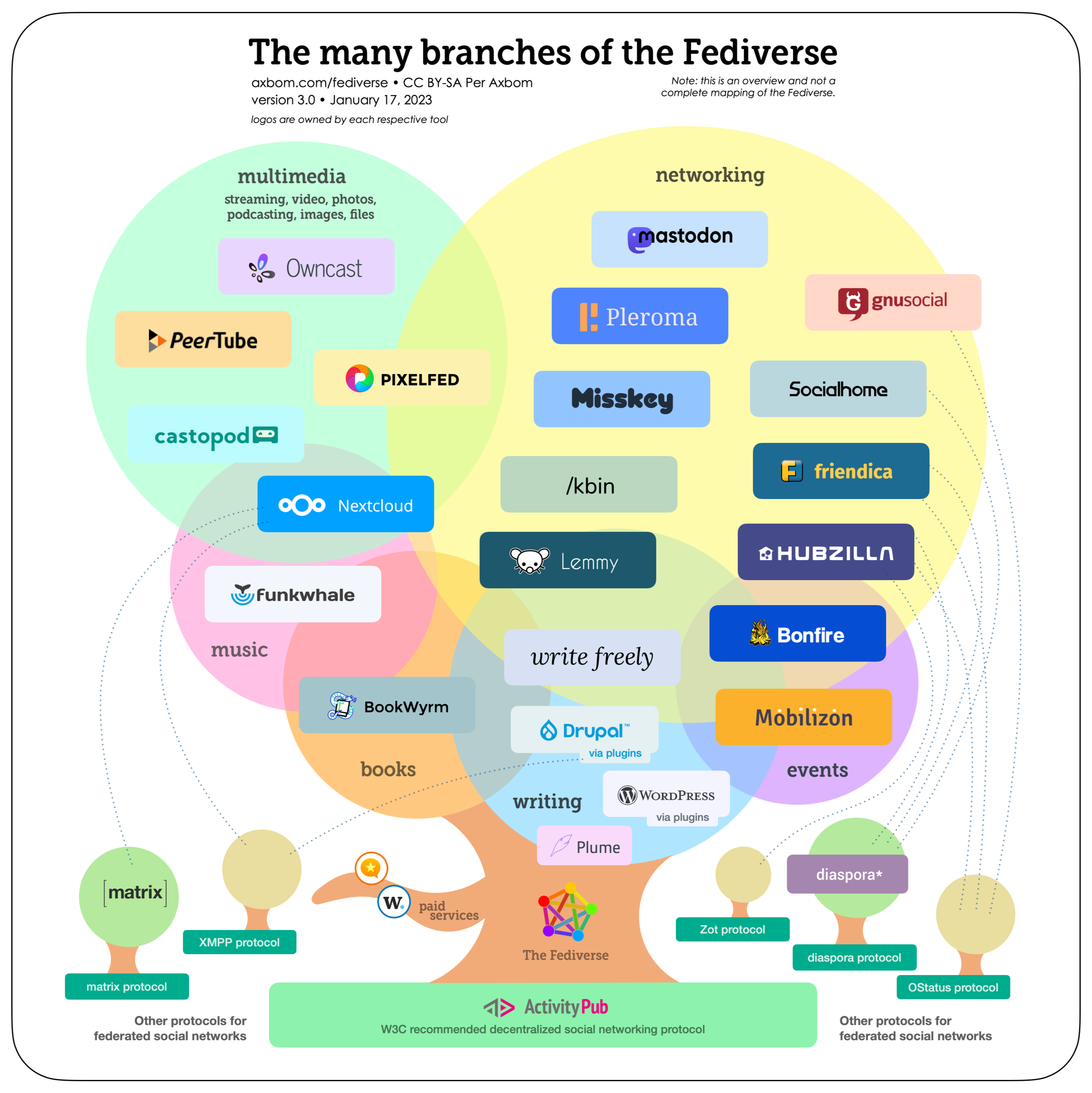
- "Tree and branches" illustration by Per Axbom
- Fediverse (social networking) is still tiny compared to corporate "social media", let's grow it together! Fediverse network stats.
- https://jointhefediverse.net/learn
- https://en.wikipedia.org/wiki/Fediverse
- https://www.theoverview.art/fediverse
Getting started on the Fediverse
- https://blog.elenarossini.com/my-fediverse-starter-guide
- För svenska Fediverse https://wiki.konstellationen.org/sv/guider/mastodon-hitta-folk
- https://critical-switch.org/en/posts/introduction-to-the-fediverse - good text, good illustrations
- https://fedi.tips
- https://fediverse.info
- https://www.sfscon.it/wp-content/uploads/2024/11/173071555849720241026-tobiasd-SFSCon24-aboutFediverse.en_.pdf#page=11
- https://fedidb.com/welcome
- Try to avoid joining the biggest instances, in particular don't choose mastodon.social. For the health of the federated ecosystem.
- https://fediverse.party - a more visual overview of the largest Fediverse galaxies
- Mastodon tools and services https://links.solarchemist.se/shaare/8mVBaQ
- Fediverse Observer https://links.solarchemist.se/shaare/jXx_gA
- https://tongfamily.com/2023/01/31/masto-understanding-and-managing-mastodon
Finding people to follow
- https://github.com/nathanlesage/academics-on-mastodon
- https://fedi.tips/how-do-i-find-accounts-to-follow-on-mastodon-and-the-fediverse-how-do-i-find-my-friends
- https://fedinyheter.nyhetskartan.se/hitta-svenskar-i-fediversum
- https://streetpass.social - a browser extension that helps you find Mastodon users as you browse the web
Useful or fun stuff built on top of Fedi
- Guide to how to use "operators" to search Mastodon effectively https://social.growyourown.services/@FediTips/116047804904821397
- https://mastodon.academy/by/@solarchemist@scholar.social (replace with any account you want to "profile")
- https://axbom.me/notice/B1kPrJcGYq6RXnAbXE - service for linking to a page where people can follow you on the Fediverse
How to manage an account as a team or organization
Not too many examples on this that I have found so far.
- https://www.vocalcat.com - I am not sure this is libre software, in any case the it's a service offered for a price.
- https://blog.adrianalacyconsulting.com/building-communities-on-mastodon
Examples and more background
- University of Groningen Library ditching Youtube in favour of PeerTube https://social.edu.nl/@Bibliothecaris/115622191356250599
- Danish National Gallery launched a Mastodon account in March 2026. Blog post: https://blog.smk.dk/smk-rhymes-with-mastodon
- University of Georgia's Museum of Art https://glammr.us/@georgiamuseum
- https://blog.zaramis.se/2026/02/18/de-fria-sociala-medierna
- https://fedinyheter.nyhetskartan.se/mastodon-infor-nytt-satt-att-rekommendera-instans
What about Bluesky and other Big Tech?
Elena Rossini har en nice presentation https://blog.elenarossini.com/if-big-tech-social-platforms-are-junk-food-and-the-fediverse-is-a-healthy-home-cooked-meal-then-what-is-bluesky
- does not federate with the Fediverse (unless the user herself sets up a "bridge")
- false promise of decentralization using the AT protocol
- your block list is publicly visible
- algorithms (controlled by the platform owner) are still king
- heavily financed by crypto-bros and other opaque sources
As a step on the journey away from Twitter it is not too bad. But please don't stop there - continue the journey towards the free, open web.
-
Despite what this report says, I would not say that "Threads and Bluesky" are "services in the fediverse". Threads does federate with the Fediverse, but in my opinion that is only a cynical effort by Facebook to "embrace, extend, and extinguish."
-
https://med.stanford.edu/news/insights/2021/10/addictive-potential-of-social-media-explained.html - book review of "Dopamine Nation" (2021) by Anna Lembke.
-
Is Big Tech social media the new tobacco? https://mastodon.social/@leavex/116020298210824813
Let's say you have a list of dicts, e.g.,
unison_jobs:
  - name: sites
    roots:
      - "root = {{ ansible_env.HOME }}/sites"
      - "root = ssh://luxor/{{ ansible_env.USER }}/sites"
    opt: "-auto"
  - name: projects
    roots:
      - "root = {{ ansible_env.HOME }}/projects"
      - "root = ssh://luxor/{{ ansible_env.USER }}/projects"
    opt: "-auto"
and you want to reference the first root element of the job named projects.
Notice that I want to reference the dicts by its name value and not by its index number (so not simply unison_jobs[n]).
This is not that hard, but enough time passes between occurrences that I forget the specifics and have to look it up again. I hope by writing it down that I will strengthen my ability to recall, or at least give myself a fixed spot to look for it.
{{ unison_jobs | selectattr('name', 'equalto', 'projects') | map(attribute='roots') | first }}How does map(attribute='somekey') work? Does it return a list even if the referenced key is a non-list item? Yes, by default it always returns a list. Does that mean we can set some option to disable that behaviour? Does not look like it, no.
- https://stackoverflow.com/a/31896249 - Ansible: filter a list by its attributes
- https://jinja.palletsprojects.com/en/stable/templates/#jinja-filters.map - I don't see any option that would force the returned value to be scalar (i.e., not list)
- https://old.reddit.com/r/ansible/comments/pqkom8/jinja_filtering_or_how_i_learned_to_filter - a very nice explainer on how to use Jinja filters such as
select,selectattr, andmap - https://www.middlewareinventory.com/blog/ansible-map
- https://stackoverflow.com/questions/71351075/selectattr-returns-generator-rows-and-cannot-use-results-as-a-dict -
selectattr()returns generator object by default - https://github.com/pallets/jinja/issues/288 -
map()filter returns generator object by default - https://www.ansiblepilot.com/articles/filtering-data-in-ansible-selectattr-and-map
For some real-life examples of this usage, see my unison and totalsync Ansible roles.
Skåpets yttermått: djup 40 cm, bredd 60 cm, höjd 60 cm. Tillgängligt djup från rack är 31 cm.
Med borst-tillsats i den övre sladd-luckan. Med 4 st externa väggfästen.
Liten kosmetisk skada på framsidan av dörren. Nyckeln till dörrlåset saknas (kolven är i upplåst läge och dörren håller sig stängd av sig själv).
Pris enl. överenskommelse, upphämtas i Ulleråker eller överlämnas enligt överenskommelse.


Här samlas den viktigaste information om de aktörer, resurser och styrdokument som är centrala för en svensk övergång till ett öppet vetenskapssystem. Portalens mål är att vara en levande webbplats som kortfattat introducerar nyckelaktörerna inom omställningen i Sverige och internationellt, och presenterar viktiga resurser. Den kommer att uppdateras och utvecklas för att spegla hur övergången fortskrider.
- https://openscience.se/vad-ar-oppen-vetenskap
- https://openscience.se/nationella-riktlinjer-for-oppen-vetenskap
- https://openscience.se/samordning-och-aktorer
- https://openscience.se/resurser
Sedan 2024 har Sverige nationella riktlinjer för öppen vetenskap. De utgör ett stöd och en vägledning för de aktörer som har ett övergripande ansvar i omställningen till öppen vetenskap.
Den 16-17 maj 2023 arrangerade Sverige konferensen "Open Science – From Policy to Practice" i anslutning till det svenska ordförandeskapet i EU. Presentationerna är inspelade och hittas på Youtube:
- https://youtu.be/NEUoBeGYYGU?t=174 - opening session "Open Science Policies in Europe – development and monitoring of national policies"
- https://youtu.be/NEUoBeGYYGU?t=2420 - "Council Conclusions and Scholarly publishing"
- https://www.youtube.com/watch?v=NU4thASddlA - Session 2, Day 1 "Aligning research assessment with Open Science"
- https://www.youtube.com/watch?v=d6zk5F2whOM - Session 3, Day 1 "EOSC – advancing Open Science to the next level"
- https://www.youtube.com/watch?v=eeGRbfZGJSU - Session 4, Day 1 "Citizen science in policy and practice"
- https://www.youtube.com/watch?v=rNQL2SHiXq4 - Session 1, Day 2 "Science for Policy making"
- https://www.youtube.com/watch?v=QuLfJNauTmA - Session 2, Day 2 "Science and society – Science communication and engagement as enablers for Open Science"
- https://www.youtube.com/watch?v=QP2M4-9RJAg - Session 3, Day 2 "Accessibility to and involvement in science" (including Closing address)
Världens bibliotek är ett digitalt bibliotek. Här finns ljudböcker och e-böcker på andra språk än svenska. Du läser och lyssnar på webbsidan. Skapa en användarprofil med din mejladress för att komma igång.
Världens bibliotek är en del av det offentliga bibliotekssystemet i Sverige och Norge. Kungliga biblioteket driver Världens bibliotek i samverkan med norska Nasjonalbiblioteket. Myndigheten för tillgängliga medier ansvarar för den tekniska driften.
Vill du veta mer om tjänsten eller har du idéer kring utvecklingen? Hör gärna av dig på adressen info@varldensbibliotek.se.
- https://www.kb.se/for-bibliotekssektorn/nytt-fran-kb/nyheter-for-bibliotekssektorn/2019-04-26-varldens-bibliotek---fri-onlinetjanst-for-mangsprakiga-bocker.html
- https://www.kb.se/for-bibliotekssektorn/nytt-fran-kb/nyheter-for-bibliotekssektorn/2025-09-01-kb-tar-over-driften-av-tjansten-varldens-bibliotek.html
- https://osc-international.com - International Network of Open Science & Scholarship Communities
- https://opensciencesweden.org - website shows no activities since last year. No RSS feed. No Masto account (only Twitter, email address and a contact form). They also have a forum https://onscienceandacademia.org/c/organisations/osc-sweden/59, but no activity there since 2023.
- https://open-science-community-uppsala.github.io/open_science_community_uppsala - Open Science Community Uppsala. Email list, Linkedin, Twitter, and Facebook. The mailing list can be followed via RSS, which should give you all future events.
- https://osc-ksa.com - Open Science Community in Saudi Arabia. Twitter, Linkedin, and Github. No Masto, and no RSS feed.
- https://help.osf.io/article/677-explore-open-science-communities - a large spreadsheet with all kinds of stuff.
Loopia has served me well for years. But they raise their prices at a cadence that is obscenely high. Alternatives?
- https://www.gandi.net - even more expensive than Loopia for
.sedomains. - https://porkbun.com - doesn't sell
.sedomains apparently. - https://zone.ee - based in Estonia. Practically the same prices as Loopia.
- https://se.godaddy.com/domains - even more expensive than Loopia for
.sedomains. - https://www.one.com - the first registrar I used, maybe good for beginners but nothing else.
- https://hostup.se/doman - baserad i Sverige.
- https://www.simply.com - 199 SEK per year for
.sedomains. - https://www.strato.se - baserad i Tyskland. 90 SEK/år för
.sevid första åsyn låter ju lovande. What? Only 5 subdomains? They're trying to limit the number of subdomains I can create? What's this nonsense. Enshittification everywhere. - https://www.hostinger.com - another one full of dark patterns. Very unclear pricing info.